
The key reference for setup and maintenance of Project is the Job Setup and Maintenance module guide.
This manual will describe the standard data that can be recorded for all project types in Jobpac. This section will cover the specific steps required to setup a Schedule of Rates project.
A schedule of rates project requires parameters to be setup in Job Maintenance. This documentation will cover just those settings required for schedule of rates projects.
Select .
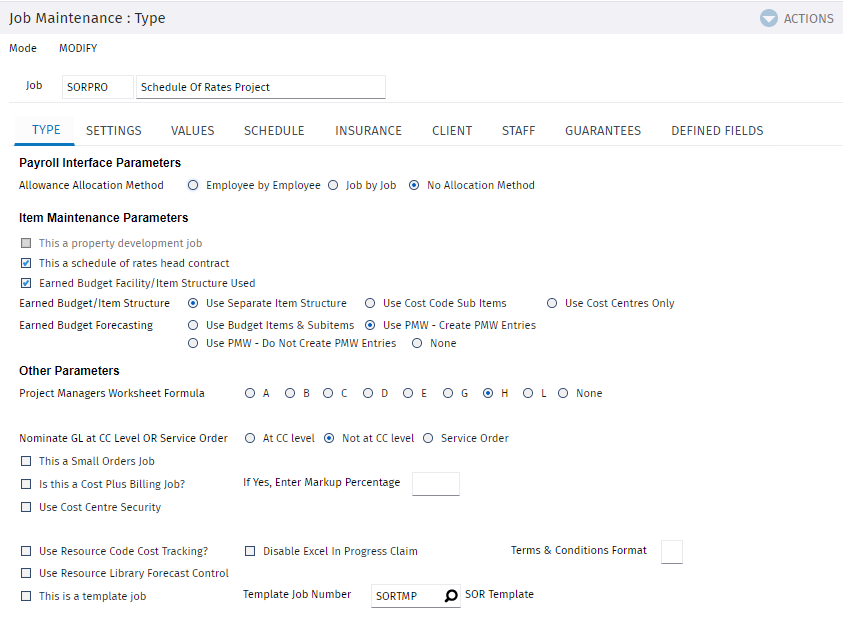
| Field | Description |
|---|---|
| This a Schedule of Rates head contract | Set to Y. This must be done before ANY activity occurs on the project. It is not possible to change this from N to Y after any budgets have been setup on the project. |
| Earned Budget Facility Used | Set this to Y. Even if you are not using Earned budget reporting, this will give you the option to use it later in the project if required. |
| Earned Budget/Item Structure | Should be set to Separate item structure. Other options not applicable to SOR projects. |
| Earned Budget Forecasting | Recommended option is PMW - Create PMW entries. This will keep Project Managers Worksheet (Forecasting entries) synchronised with sub item details (known as resource names or descriptions). |
| Project Managers Worksheet Formula | This must be set to H. This means the system uses Cost of Work in Progress as the starting point to forecast cost to complete for Schedule Items, and cost centres. |
| Use Forecasting by Input of Forecast Rate to Complete | Optional – Set to Y to enable the input of the Forecast Rate to complete for a whole Schedule Item on the Project managers Worksheet Forecasting by Item screen. This overrides forecasting done at the Schedule Item Resource Name level. Two options exist for this function. The default is to update each resource rate proportionally with the change in FFC Rate. The other option is for the system to calculate the overall change in forecast for the Schedule Item, and to assign this change to the nominated cost centre. |
| This is a template job | Set to Y to use the Cost Centre structure of this job as a template for other jobs. When set to Y a template job number cannot be entered for this job. This should be set to N for a schedule of Rates project. |
| Template Job Number | When using Expert Estimation template to create a Schedule Item structure, enter a template job number which will be used to validate cost centres during the import process. Any cost centres created later in the project must be present in this template job. |
| Use Resource Library Forecast Control | This is only set to Y if the resource library is to be used. If the resource library is used, resources are called Resource Names, and if it is not used resources are called Resource Descriptions. |
Note: In the Values Tab, no contract amounts or margins are entered as
these are automatically calculated when Schedule Item prices and budgets are entered via
Item Maintenance or by Upload of the Schedule.