
With this release, when you upload an invoice that has already been uploaded to Automatic Invoicing before, it is marked as a duplicate. You can also view the batch name and date of the previous invoice(s) and view them.
Duplicate Invoices Identified Across Batches
With this release, if you upload an invoice that has previously been uploaded to Automatic Invoicing, that invoice is marked as a duplicate. In addition, you can view the batch name in which that invoice was previously included as well as the date it was previously uploaded, and open the previous invoice.
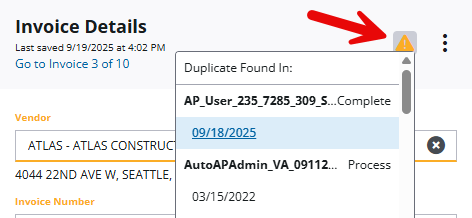
From the Process page, under Invoice Details, select the yellow warning icon to view information about when that invoice was previously uploaded. From the drop-down menu, select the date to open the previously uploaded invoice.
For a duplicate invoice, check the invoice details to verify that the invoice is, in fact, a duplicate. If so, you can remove it by selecting the trash icon. If it is not a duplicate, you can correct the details.