
A New Report is available that covers both QLD PTA Reconciliation and NSW SC Retention Held In Trust legislation, that enables you to reconcile PTA accounts or Retention Held in Trust Accounts at any point in time.
The report will show account differences that may prompt bank transfers to ensure compliance.
It is envisaged that this report may be run possibly multiple times a month after Payment and Invoice runs to ensure compliance.
Reconciliation Report Control Parameters
PTAREP - PTA Report Bounding Defaults
Positional Parameter to control default elements of the Bounding screen for Summaries and other options as described:
- Pos 1. Default for "Summarise HC Progress Claim History" (Y/N)
- Pos 2. Default for "Summarise SC Claim History to Agreement" (Y/N)
- Pos 3. Default for "Summarise Bank Transactions" (Y/N)
- Pos 4. Default for "Start Reporting Date" (ddmmyy) can be blank.
- Pos 5. Default for "Summarise PO Invoice History to Order" (Y/N)
- Pos 6. Default for "Include Excluded SC claims in exception list" (Y/N)
- Pos 7. Default for "Include Excluded PO Invoices in exception list" (Y/N)
- Pos 8. Default for "Show Unpaid Transactions" (Y/N)
- Pos 9. Default for "Show Retention Balances Including Tax" (Y/N)
Report Options and Processing
- Navigate to the new PTA Reconciliation Report via menu path: .
- You will see a selection screen as shown below (or wherever you have added the report on your customisable menus).
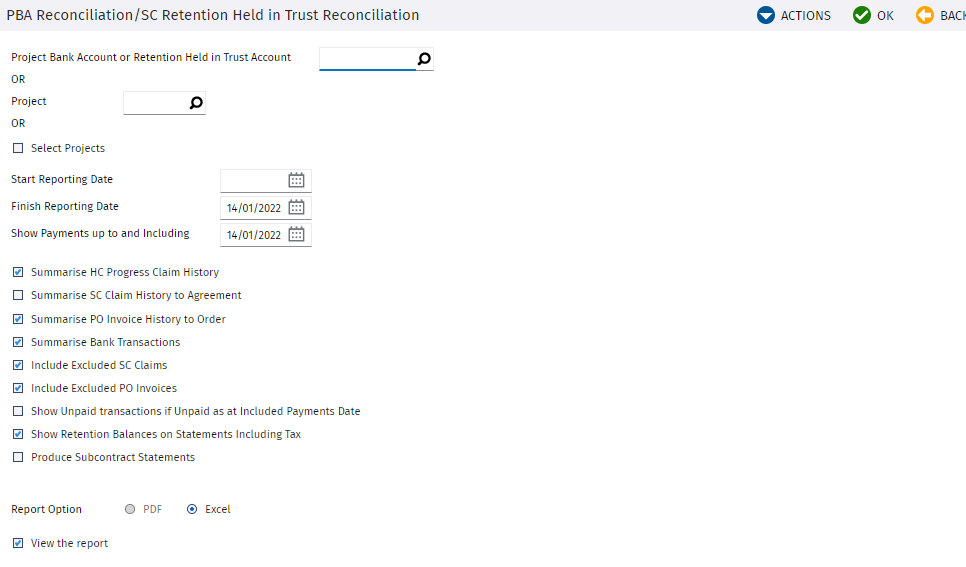
- Populate the Bounding options as described below and click
ok to run the report.
- Select Project Trust
Account or Retention Held in Trust account
- This bounding option will generally be used for SC Retention Held in Trust Reconciliations where it is allowed to have multiple projects in one account typical of a NSW setup, but it can also be used for QLD PTAs.
- This field will default to the SC Retention held in Trust Account system parameter if the parameter is setup.
- Scanning on this field will show a list of All Project Trust Account numbers gathered from all projects that are flagged as qualifying AND have Project Trust Accounts or SC Retention Trust Accounts set up.
- Selection of an account will first gather all projects that have this account as any one of their 3 Trust accounts and the Report will be prepared on the basis of this group of projects or individual project.
- Projects will only be included if they have qualified before the Finish Reporting Date.
- Select Project
- This option will generally be used for PTA Reconciliations for single projects
- Should not be selected in combination with Account above. I.e. one or the other.
- Running the report by Job will gather reconciliation information for the project for all Trust accounts set up on that project subject to other bounding options
- Start Reporting Date
- This date will be the Start date for the Reporting period and it can be left blank to include all values up to the finish date.
- It will default to beginning of time or to the default set up in the report options system parameter
- HC Claim History Transactions will only be included if:
- they fall within the Reporting date range and
- the transaction date is after the Project Qualification Date. Based on Invoice Date
- And the Job Qualification date is before the Finish reporting Date.
- SC Claim History Transactions will only be included if:
- they fall within the Reporting date range and
- the transaction date is after the SC Qualification Date. Based in Invoice date
- And the SC Qualification date is before the Finish Reporting date.
- Bank account transactions will only appear if they fall within the Reporting date Range
- Finish Reporting Date
- This date will be the Finish date for the Reporting period
- It will default to today’s date
- HC Claim History Transactions will only be included if:
- they fall within the Reporting date range and
- the transaction date is after the Project Qualification Date. Based on Invoice Date
- And the Job Qualification date is before the Finish reporting Date.
- SC Claim History Transactions will only be included if:
- they fall within the Reporting date range and
- the transaction date is after the SC Qualification Date. Based in Invoice date
- And the SC Qualification date is before the Finish Reporting date.
- Bank account transactions will only appear if they fall within the Reporting date Range
- Show Payments up to and Including
- This date will control up to which date the payment information will be shown against transactions included in the reporting range, and is used for fine tuning of the report where perhaps recent payments need to be excluded at a particular reconciliation point.
- Summarize HC Progress Claims History
- HC Claim history is significant for PTA reconciliation of the “Project Specific PTA”
- Default based on System Positional Parameter for PTA Report Defaults
- If HC Claim History is summarized then All Job information will show on one line
- It is anticipated that for NSW Retention Held in Trust Reconciliations this section will be summarised but the Project Qualification dates will be significant.
- Summarize SC Claim history to Agreement
- Default based on System Positional Parameter for PTA Report Defaults
- If Summarised It will be summarised to Agreement level and All Information will appear on one line including Subcontractor and ABN Number
- Summarize Bank Transactions
- Default based on System Positional Parameter for PTA Report Defaults
- If Summarised all information for each account will appear on one line
- Include Excluded SC Claims
- Default based on System Positional Parameter for PTA Report Defaults
- If ticked on then the report will show SC claim exceptions so that you can review and include if required.
- Include Excluded PO Invoices
- Default based on System Positional Parameter for PTA Report Defaults
- If ticked on then the report will show PO Invoice exceptions so that you can review and include if required.
- Show Retention Balances on Statements Including tax
- Default based on System Positional Parameter for PTA Report Defaults
- If ticked then the Payment Instruction details and balances in the last two columns of the Subbie Statements if run in Subcontract Statements mode will include tax. If not ticked then tax will be excluded.
- Produce Subcontract Statements
- If run with this flag ticked you will be running in Subcontractor Statement Mode. If run in this mode then instead of producing the Reconciliation Report it will produce JOM form statements for each Subcontractor in the Report and will allow you to distribute the forms directly to Subbies. It is advisable to run in this mode only after successful reconciliation of accounts as the Subcontractor Statement Mode assumes that sufficient funds have been transferred and are held in the SC Retention Trust account for the Subbie.
- Select Project Trust
Account or Retention Held in Trust account
Understanding the Report Format
This section describes how the reconciliation report can be read.
The report is grouped in rows as described below, each with heading lines and total lines at appropriate points.
Additionally the report is grouped in columns that relate to the reconciliation of the 3 trust account definitions for Project Specific PTA’s, Retention PTA’s, and Disputed funds PTA’s. Noting that for NSW SC Retention Held in Trust Reporting, probably only one of the column groupings will be relevant to reconciliation, that which relates to Retention.
The report will have a Trust Account Reconciliation line in bold yellow that will show GL account differences that can be used to true up accounts.
And at the bottom of the report will be non-qualifying SC Claim history details so that you can easily see exclusions either due to non-qualification or exclusion by SC Qualification date. Excluded PO’s can also be shown
The Qualifying Projects & Head Contract Claim History Section
- Referring to the report extract shown below, this section of the report will show all Qualifying Projects that are included in the reconciliation including their Contract Value and Qualification Date.
- In detail Mode for each project you will see the HC Claims and Invoiced History subject to the reporting date bounds specified.
- In the Claimed & Paid Reconciliation Columns you will see the
- Invoice Date
- The Net Certified Claim Value excluding retention (AR Invoiced Value excluding GST)
- Received amount (Including GST), which is important for reconciliation of the General PTA under QLD PTA legislation.
- As mentioned this section is less relevant in detail for NSW SC Retention Held in trust legislation but useful in Summary to show what Jobs are included in the report.
Fig. The Qualifying Projects & HC Claims History Section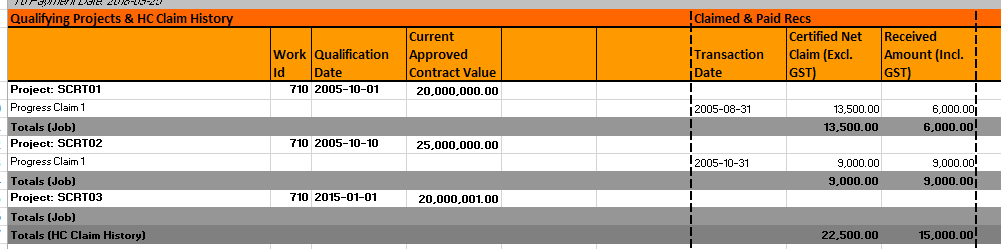
The SC Claim History Section
- Referring to the report extract shown below, this section of the report will show all Qualifying SC Claims for Qualifying Projects that are included in the reconciliation including their Contract Value and Qualification Date.
- In detail Mode for each project you will see the SC Claims and Invoiced History subject to the reporting date bounds specified.
- In the Claimed & Paid Reconciliation Columns you will see the
- Invoice Date
- The Authorised SC Claim Value excluding GST (less retention held)
- Total Invoiced Amount (Incl. GST) coming from AP Transactions, which is important for reconciliation of the General PTA under QLD PTA legislation.
- In the Retention Held Reconciliation Columns you will see the:
- Retention Held/ Released (Excl. GST)
- Retention Held/ Released (Incl. GST) which is important for reconciliation of the Retention Held in Trust account
- In the Disputed Funds Reconciliation Columns you will see the:
- Total Invoiced Amount (Incl. GST) from AP transactions
- Paid Amount (Incl. GST) from the AP Payment history (subject to payment date bounds)
- Unpaid/Disputed Amount (Incl. GST) which is the
difference between Invoiced and Paid if there has been a part payment of
an authorised invoice. This column is important for reconciliation of
the Disputed Funds PTA account under QLD PTA legislationNote: A disputed amount will not show if there has been no payment at all on an Invoice. Part payment is required for a disputed amount to show.
Fig. The SC Claims History Section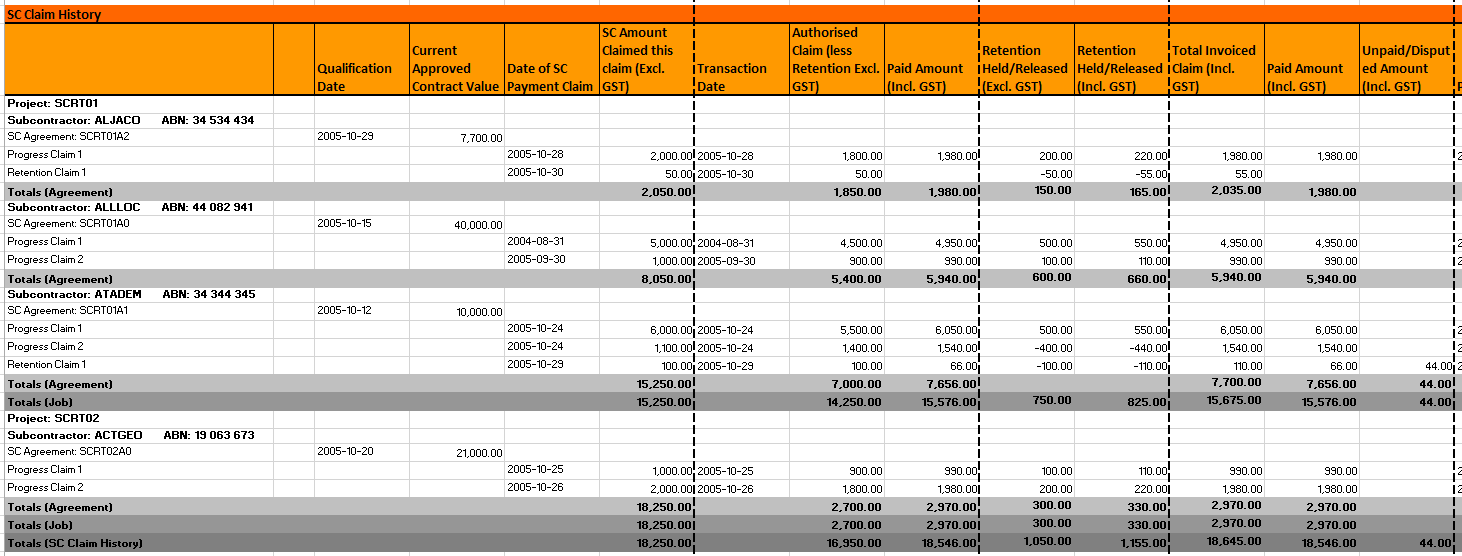
The PO Invoice History Section
- This section of the report will show all Qualifying PO’s for Qualifying Projects that are included in the reconciliation including their Contract Value and Qualification Date.
- In detail Mode for each project you will see the PO Invoice History subject to the reporting date bounds specified.
- In the Claimed & Paid Reconciliation Columns you will see the:
- Invoice Date
- The Authorised Invoiced Amount excluding GST less retention held (not currently applicable)
- Total Invoiced Amount including GST coming from AP Transactions, which is important for reconciliation of the General PTA under QLD PTA legislation
- In the Retention Held Reconciliation Columns are not currently applicable
- In the Disputed Funds Reconciliation Columns you will see the:
- Total Invoiced Amount (Incl. GST) from AP transactions
- Paid Amount (Incl. GST) from the AP Payment history (subject to payment date bounds)
- Unpaid/Disputed Amount (Incl. GST) which is the
difference between Invoiced and Paid if there has been a part payment of
an authorised invoice. This column is important for reconciliation of
the Disputed Funds PTA account under QLD PTA legislationNote: A disputed amount will not show if there has been no payment at all on an Invoice. Part payment is required for a disputed amount to show.
The Bank Account Transaction History Section
- Referring to the report extract shown below, this section of the report will show all GL account transactions for the Trust Accounts included in the report.
- If the report is run for a Job and the Job is subject to PTA legislation you should see transactions and totals for 3 PTA Trust Accounts set up on that Job.
- If the Report is run for a SC Retention Held In Trust
account under NSW legislation then you will see transactions and totals only for
the SC Retention Held in Trust Account.Note: The Trust account details will be aligned with the relevant reconciliation columns.
- General PTA Account details will be aligned with the Claimed & Paid Rec Columns
- Retention PTA/SC Retention Held In Trust Account details will be aligned with the Retention Held Rec Columns
- Disputed Funds PTA account details will be aligned with the Disputed Funds Rec Columns
- Totals will show for each Trust account in the appropriate Reconciliation Column as shown below.
Fig. The Bank Account Transaction History Section
The Trust Account Reconciliation Difference
- Referring to the report extract shown below, immediately below the Bank Account Transaction History section you will see reconciliation total lines that show values from other sections in the report appropriately aligned to the correct Trust account reconciliation Columns
- You will see a yellow total line with the Trust Account Reconciliation differences that can be used to journal your trust accounts and true them up including whether a debit or credit is required
- Each Total line is labelled and the reconciliation differences calculations shown for your reference
- There is also a space at the bottom that you could use to manually adjust for Bank Fees, Interest and other transactions that may be impacting your Reconciliation as shown below.
Fig. The Trust Account Reconciliation Difference
- It is important that you understand the legislation and
maintain your trust accounts with the correct balance to ensure you are
compliant at appropriate times in the month. Likely journals / direct debits
required to true up accounts may include the following examples:
- If under PTA legislation there has been a part payment you may need to debit the Disputed Funds Account and credit the Cash Account from which the original payment was made.
- You will need to debit the Retention PTA / SC Retention Held in trust account to cover retention held including GST. The credit may come from your Specific Project PTA account or another cash account depending on the legislation you are operating under.
- You may need to credit the Retention PTA / SC Retention Held in Trust account and debit the Specific Project PTA or other cash account if you have made payments to release retention from the incorrect Cash account
Your Retention PTA account should hold enough cash to cover all retention currently held including GST.
Your Disputed funds account should hold enough money to cover the unpaid portions or part paid invoices including GST.
The Non-Qualified SC Claims and PO’s Section
- At the bottom of the report will be non-qualifying SC Claim history details so that you can easily see exclusions either due to non-qualification or exclusion by SC Qualification date.
- Non Qualified PO’s will also be included.
Fig. The Non-Qualified SC Claim Section