
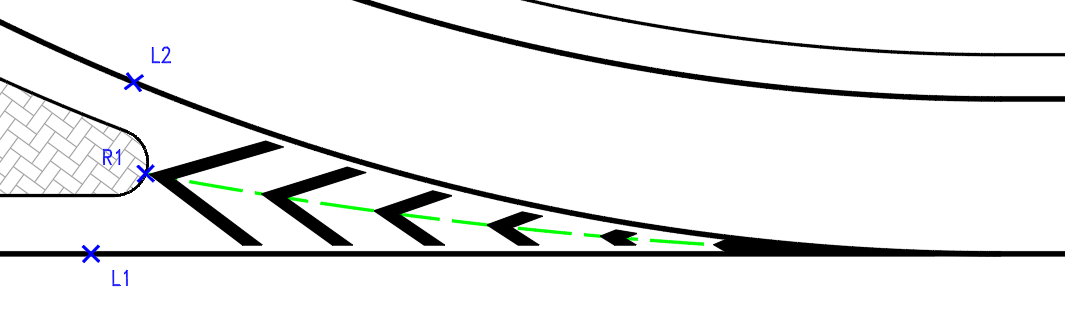
Chevron markings (type 2) are a specialized form of hatched road marking featuring diagonal stripes in a "V" pattern to indicate where traffic splits or merges. To ensure proper vehicle guidance, the key design requirement dictates that the point of the "V" must face directly into oncoming traffic, serving as a visual wedge that directs vehicles to the left, to the right, or into merged lanes. This functionality facilitates the design of hatched areas using type 2 chevron lines.
The following sequence of questions will appear at startup:
- Select reference line (Line, arc, or polyline):
- Select a open polyline or arc or line: (R1)
- Reference object, Reference angle:
- Select first Reference object (polyline or line or arc): (L1)
- Select second Reference object (polyline or line or arc): (L2)
Example using a reference line and two reference objects:
Note: All SNAP functions in CAD can be utilized
for accurate positioning.