
What's new includes a summary of new features and resolved issues for the ProjectSight Mobile application in June 2026.
June 8, 2026
Version 2.45.3
Feature enhancements
Redesigned Sync Logs
Rich, Contextual List View: You no longer need to open individual logs blindly. The main list view now prominently displays the sync operation type (such as Project Sync, Portfolio Sync, Project Download, or Fetch Files) alongside specific project or portfolio names and local timestamps so you can identify the exact log you need at a glance.
Time-Based Organization: To match how you naturally look for recent activity, logs are now automatically grouped into smart chronological buckets: Past Hour, Earlier Today, Yesterday. Historical daily folders extend back 14 days.
Figure 1. Redesigned sync log 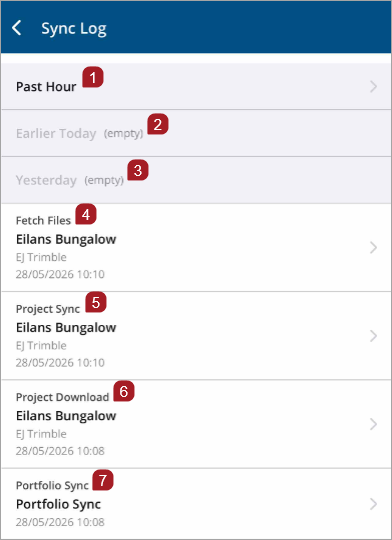
- Past hour - Most recent syncs
- Earlier Today - Today's syncs before the past hour. The empty time period is greyed out.
- Yesterday - Previous day's complete sync history. The empty time period is greyed out.
- Fetch Files - File retrieval operations
- Project Sync - Full project synchronization
- Project Download - Initial project download
- Portfolio Sync - Portfolio-level sync operation
Note: Existing sync logs created before the version 2.45.3 upgrade will still display a general error of Log instead of specific categories like Fetch Files or Project Sync.Figure 2. Existing sync logs 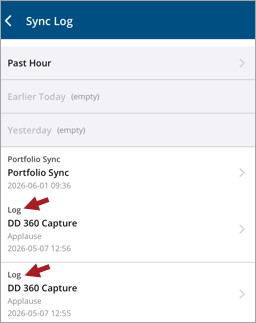
Smart Sharing System: Sharing diagnostic data with support is now easier. The app intelligently analyzes log sizes to optimize how they are sent:
- Small logs (< 32 KB) are pasted directly as inline text into your email or messaging app for instant readability.
- Large logs (≥ 32 KB) are cleanly packaged as a structured TXT file attachment to keep your communications tidy.
- You can also share an entire time bucket's logs at once, with clear dividers automatically separating each run.
Select a sync log to view sync details. Then to share sync data details from the Log Information page, select Share
 .
.Figure 3. Log Information page Share icon 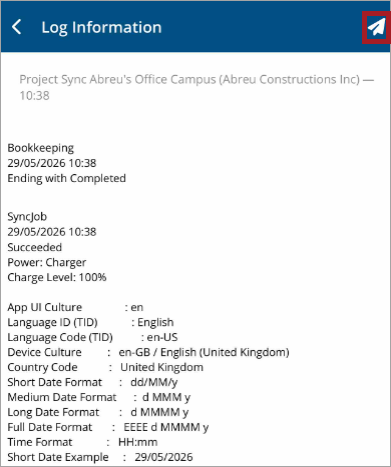
360 Capture
To accommodate large files and limited phone storage, you can now upload 360 captures via a web browser. The mobile app will sync your video details and display the status of your web uploads.
Figure 4. Status banner for 360 Capture web uploads 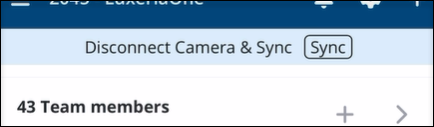
Resolved issues
- Resolved an issue where downloading large projects caused delays or a failure to complete. (CN 000005121 / PS-68432)