
Chat with the User Assistant

Modified: 21 Aug 2026 Tekla Structures - Not version-specific Tekla Structural Designer - Not version-specific Tekla Tedds - Not version-specific Tekla Tedds for Word - Not version-specific Tekla PowerFab - Not version-specific Tekla PowerFab GO - Not version-specific
Not version-specific
Tekla Tedds Tekla Tedds for Word
Not version-specific
Tekla Structures
Not version-specific
Tekla Structural Designer
Not version-specific
Tekla PowerFab Tekla PowerFab GO

The User Assistant provides support for Tekla Structures, Tekla Structural Designer, Tekla Tedds, and Tekla PowerFab.

The User Assistant uses content in Trimble User Assistance to answer your questions.

The User Assistant is available to users who have a valid commercial named user subscription license.

Use the User Assistant in the side pane of the Tekla Structures application

The Trimble Assistant for Tekla side pane lets you use the User Assistant in the Tekla Structures application.

The Trimble Assistant for Tekla side pane is installed by default in Tekla Structures 2025 SP5 and later.

  1. In Tekla Structures, open the Trimble Assistant for Tekla side pane.
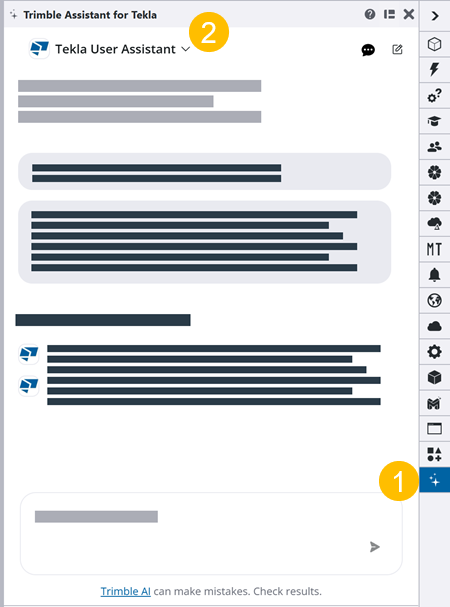
  2. If the User Assistant is not already selected, select User Assistant from the list of assistants at the top of the chat.
  3. Ask your question using natural language.

    For a better response, provide context and be specific.

    Tip:

    You can ask the User Assistant to translate the response if you prefer a language that is not supported in Trimble User Assistance.

    Example: What are the best practices for exporting IFC files from Tekla Structures for BIM collaboration?

    The User Assistant generates a response that includes links to the Trimble User Assistance content that it used to answer your question.

Chat with the User Assistant in a web browser

If you do not use the Trimble Assistant for Tekla side pane, you can use the User Assistant in a web browser to get support for Tekla products.

  1. In a web browser, go to Trimble Assistant for Tekla.
  2. If the User Assistant is not already open, select User Assistant from the list of assistants at the top of the chat.
  3. Ask your question using natural language.

    For a better response, provide context and be specific.

    Tip:

    You can ask the User Assistant to translate the response if you prefer a language that is not supported in Trimble User Assistance.

    Example: What are the best practices for exporting IFC files from Tekla Structures for BIM collaboration?

    The User Assistant generates a response that includes links to the Trimble User Assistance content that it used to answer your question.

Submit

Table of Contents