You can subscribe to receive status notifications from the
Viewpoint Status site for your selected
regions and applications.
When subscribed, you will receive notifications for
issues affecting system availability, software updates, or system maintenance.
-
Open Status.Viewpoint.com in a browser.
-
Click Subscribe to Updates.
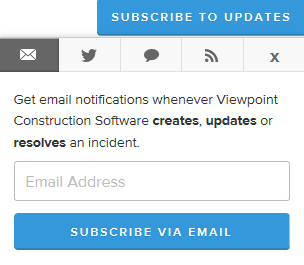
You can get status updates multiple ways, including email, Twitter (@ViewpointStatus), or
by Atom or RSS feed. Click the tabs on the dialog (shown in the following image)
for details on each option.
-
For email updates, with the email tab selected, enter your email address and
then click Subscribe via Email.
-
From the Notifications Subscription page, you can
customize your notifications to include only updates for selected products and
components in selected regions. Clear or select check boxes as needed. When
finished customizing your subscription, click Update
Preferences.
-
You will receive a confirmation email from webadmin@viewpointalert.com. Once
you do, open it and click Confirm subscription.
Note: You can change your subscription settings at any time. To make changes, repeat
steps 1-4.
