Trimble is transitioning to a unified software licensing system, which will centralise Viewpoint licence administration in the Admin Console for a simplified and consistent licence management experience.
No Action is Needed Today
User licence management flows are not changing yet, so you don't need to change any of your user licence management processes. This is for information only so you know what is coming later.
Coming Soon: Managing Trimble Viewpoint Solutions in the Admin Console
Because administration capabilities are being centralised in the Admin Console, if you have licences for Trimble Viewpoint solutions, you will soon notice changes in how you manage your licences and assign users to products.
In the Admin Console, you can see all your users, subscriptions, and invoices for all your Trimble orders. While not required now for Trimble Viewpoint solutions, you can use the Admin Console to manage your licences for many Trimble products. To learn more, see About Account Administration.
This transition - of bringing user and licence management of Trimble Viewpoint solutions into the Admin Console - is part of our Connect and Scale initiative, aimed at providing a simplified and consistent licence management experience across all Trimble products and services. The transitional period began in December 2025 and will continue through the first half of 2026. We will update this page as the process moves forward.
Relevant Products
- Vista and related products
- Spectrum and related products
- Viewpoint Team
- Traqspera and related products
What You May Encounter
Even though you can now view your Trimble Viewpoint subscriptions in the Admin Console, you should keep managing your users in the same ways as you do today:
- For Trimble Viewpoint products, you still need to manage user access within the individual Viewpoint application.
- You will continue to grant user licences for your Trimble Construction One solutions in the Admin Console.
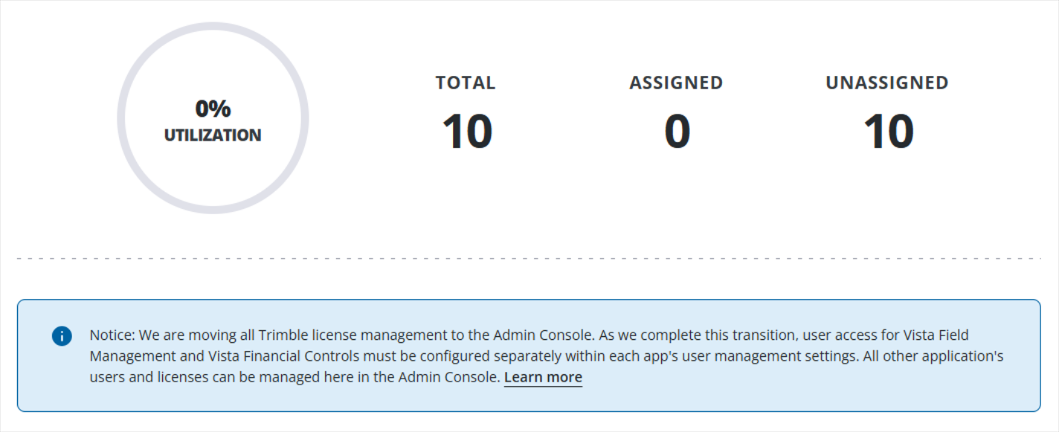
To help you know how you should handle user management for a given Trimble Viewpoint product and/or subscription, the Admin Console displays information notices. See the example provided.
Information Notices (Example)
- ProjectSight
- Estimation MEP
- Trimble Connect
- VistaField Management
- VistaFinancial Controls