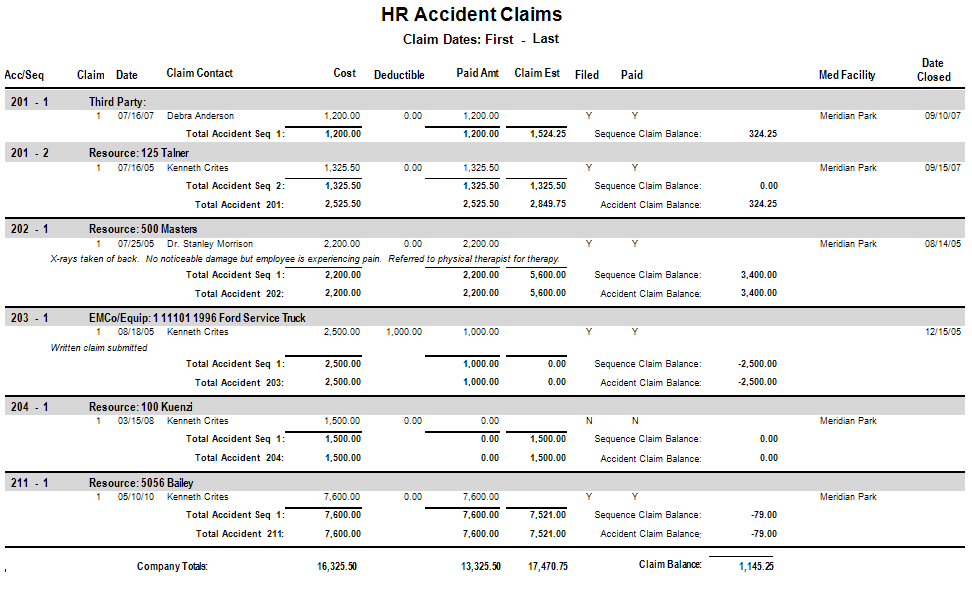
You can use the HR Accident Claims report for a list all of claims by accident seq. (cost, deductible, paid, claim closed, etc) by selecting .
|
Report Parameters | Description |
|---|---|
|
Company |
Accept the default, or press F4 to select a company. |
|
Accident (Blank for All) |
Click the Field Lookup button or press F4 to select the Accident ID or leave blank for all. |
| Beginning Claim Date | Enter beginning claim date. |
| Ending Claim Date | Enter ending claim date. |
| Print (R)esources, (T)hirdParty, (E)quip, (A)ll | Enter R, T, E, or A |
| Resource |
Select the Field Lookup button or press F4 to select the resource or leave blank for all. |
| EMCo (Blank for All) | Click the Field Lookup button or press F4 to select the EMCo or leave blank for all. |
| Equipment (Blank for All) | Click the Field Lookup button or press F4 to select the equipment or leave blank for all. |
|
Print Notes? |
checkbox to print notes. |